The short answer
Running Claude Code through Termius or Blink Shell works. You SSH into your Mac or server, attach to the tmux session, and type as if you were at your desk. Both apps have leaned into this over the past year with voice input, prompt composers and keys that Claude Code needs. What doesn't change is that you are reading a terminal. Whether the agent is waiting for approval or still working is something you find out by opening the app and scrolling, and iOS may drop the connection while your phone is in your pocket.
BotBus swaps the interface instead. It reads the agent's own session data on your computer and shows tasks, conversations, approval cards and multiple-choice questions on your phone, with a push notification only when the agent needs you. When you do need a shell, there is a terminal under "Operate computer". If you SSH into many different hosts, manage keys and jump boxes, or run agents BotBus doesn't support, stay with Termius or Blink. If your main job on the phone is watching Claude Code or Codex and approving their requests, BotBus is worth a look.
Facts about Termius come from termius.com (download, pricing and security pages), its official docs and changelogs, and its blog. Facts about Blink Shell come from blink.sh, its docs, the blinksh/blink GitHub repo and its App Store listing. Everything was checked on October 27, 2026. I covered SSH + tmux as a general approach in Claude Code Remote Control alternatives, so this post sticks to the two apps.
Where Termius and Blink are today
Termius
Platforms and protocols. The download page lists desktop apps for Windows, macOS and Linux plus mobile apps for iOS and Android. The pricing table covers SSH, SFTP, Telnet, Mosh and a local terminal, along with port forwarding, jump hosts and proxies.
Agent-specific work. In the iOS changelog, 6.3.0 added Shift+Tab to the extra keyboard row, explicitly for Claude Code and similar tools. 6.3.3 let you configure Gemini, Claude Code, OpenCode and others on a host so they launch when you connect, and added a prompt field with speech-to-text. The Android app later got Shift+Tab and voice input too. A May 2026 post on the Termius blog lays out its recommended mobile setup: put claude in the startup command, keep the session alive with tmux, use Mosh, port-forward to preview a dev server on the phone, dictate prompts, and save common prompts as snippets.
Touch ergonomics. The docs describe a customizable hotkey row, long-press-and-drag to move the cursor, space-bar swipes for arrow keys, double-tap for Tab, pinch to resize text, volume keys bound to actions, and the soft keyboard hiding itself when a hardware keyboard is connected.
Background sessions. The same blog post says to turn on Live Activities on iOS to keep sessions alive in the background, and to disable battery optimization on Android.
Pricing and sync. Billed annually, Starter is free (local vault, SSH/SFTP, AI autocomplete). Pro is $10/month and adds a personal cloud vault synced across devices, session logs and snippet automation. Team is $20 per user per month with shared vaults and real-time collaboration, and there are Business and Enterprise tiers above that. The security page says the synced vault is end-to-end encrypted with a client-side key derived from your password. Termius is not open source.
Notifications. As of the check date, neither the changelogs nor the blog mention a push notification when a command or agent finishes. Codex isn't mentioned either.
Blink Shell
Platforms and protocols. iPhone and iPad only (the App Store also lists visionOS), iOS/iPadOS 17.6 or later, with no Android or desktop version. It supports SSH and Mosh, port forwarding, ProxyCommand and ssh-agent, plus SFTP, Files app integration and a set of local UNIX tools.
Agent-specific work. Version 18.5.0 added a Prompt Mode for writing AI prompts, with voice input, and a hide-keyboard button. Neither the listing nor the website mentions Claude Code or Codex by name.
Touch ergonomics. A SmartKeys bar holds Ctrl, Alt, Esc and the arrow keys. Hardware keys can be remapped, and gestures cover a two-finger tap for a new shell, swiping between shells and pinch to zoom.
Background and notifications. The notification docs say plainly that iOS may kill the connection, and suggest the geo command to keep SSH alive. For alerts, you print a bell or an OSC 9 / OSC 777 sequence at the end of your command to trigger a local notification. The docs note that some sequences don't work over Mosh.
Pricing and license. Two weeks free, then $19.99/year, with a free Blink Shell Classic also available. The code is GPL-3.0. Blink also offers Blink Code, which connects to VS Code for the web, GitHub Codespaces and similar services, and Blink Build, a cloud dev VM that the docs describe as an open beta for Blink+ users.
When Termius or Blink is the better fit
These are real strengths that BotBus doesn't offer or doesn't plan to:
- You connect to more than your own computer. Cloud servers, bastions, routers and a Raspberry Pi, with hosts, keys and jump boxes all managed in one place. BotBus only talks to machines running the BotBus desktop app.
- Any program runs. Any agent, any TUI and any script work without waiting for an integration. BotBus's task view only covers supported agents.
- A full terminal experience. Tuned keyboards, gestures, Mosh and hardware keyboard support make long sessions comfortable. BotBus's terminal is a tool inside "Operate computer", not the main screen.
- No third-party relay. SSH and Mosh go straight from your phone to your machine over a network path you choose. BotBus always goes through our relay.
- Open source or free to start. Blink is GPL-3.0 and Termius has a free tier.
- Team features. Termius has shared vaults and real-time collaboration. BotBus doesn't.
If one of these is a hard requirement, stick with the SSH app.
What BotBus does differently
Tasks instead of scrollback
The tiring part of managing an agent in a phone terminal is working out what state it's in. The approval prompt may have scrolled off screen, and answering a question means typing the right option number on a small keyboard. BotBus reads the agent's own session data and events. Your phone lists tasks by computer and project, each marked running, waiting for approval, waiting for a reply, done or failed, and the conversation reads like a chat.
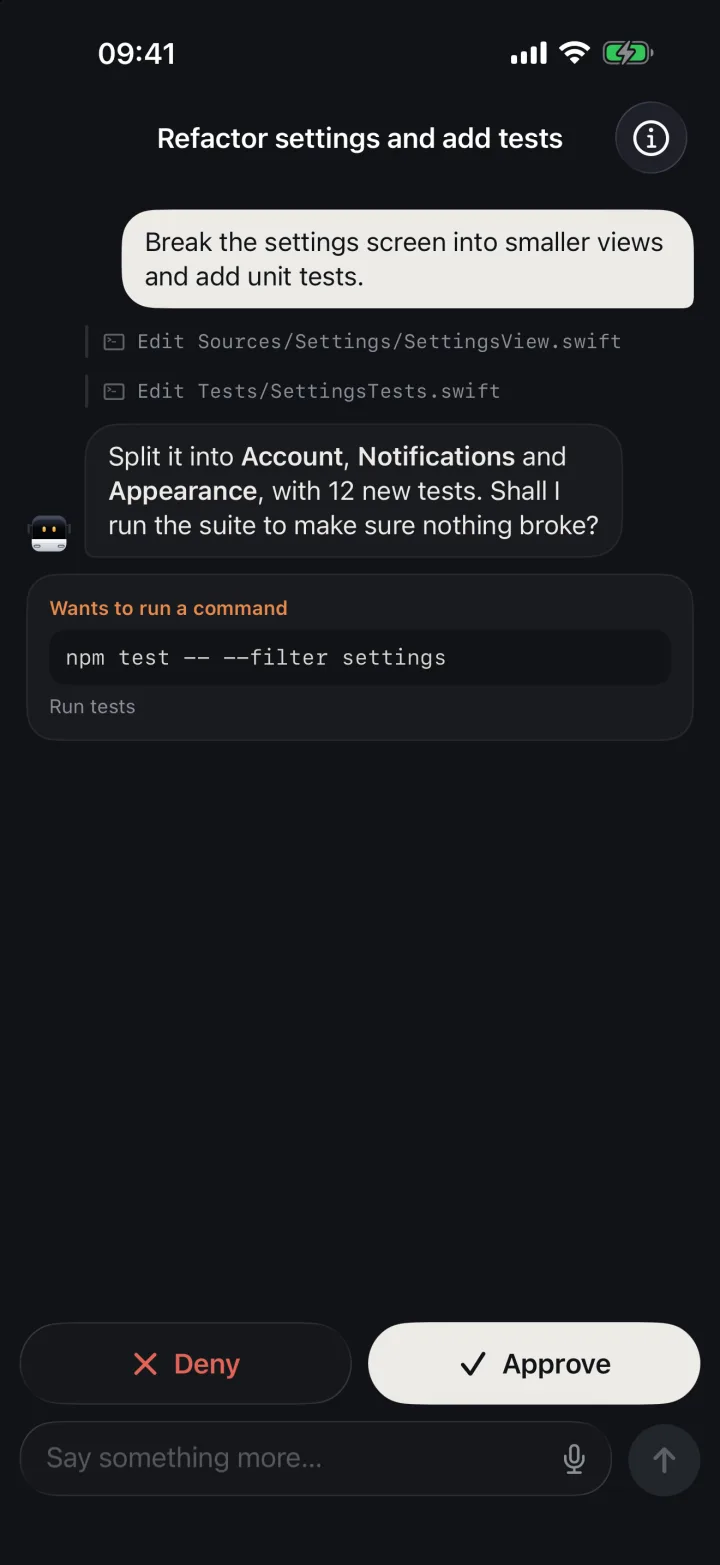
When the agent wants to run a command or edit a file, you get a card saying what it wants to do, with Approve and Deny buttons. Multiple-choice questions are answered with a tap. You can also follow up, interrupt the current turn or start a new task. Whether each action is available depends on the agent's connector, the task's state and whether the computer is online. More in approving Claude Code from your phone.
No connection to babysit
An SSH app only knows what the agent is doing while it's connected, which is why Live Activities and geo exist. The BotBus desktop app keeps its own connection to the relay, so your phone app can stay closed. You get a push when the agent waits for approval, waits for a reply, finishes or fails, and tapping it opens that task. Apple's push service only sees a fixed line of text and an encrypted payload, which your iPhone decrypts locally before showing the real content. Delivery still depends on your notification permissions. See coding agent push notifications.
Sessions show up on their own
You don't need a special way to launch agents for the phone. Codex sessions are read (read-only) from ~/.codex. After a one-time hooks install in BotBus settings, Claude Code sessions from the terminal, an IDE or the Claude desktop app all appear on the phone. Hermes, Pi, OpenClaw and DeepSeek Harness are built in, and any ACP agent such as OpenCode can be connected. See the connection guide. One phone can pair with several computers, mixing Mac, Linux and Windows. If your Claude Code lives on a Linux server, install the Linux build of BotBus there.
A terminal when you need one
For anything the task view doesn't cover, open "Operate computer" from the chat screen to browse, edit and upload files or to open a terminal. It runs your login shell on Mac and Linux and PowerShell on Windows, and the iPhone keyboard gets a row of common keys. Terminal sessions live on the computer, so a dropped connection or a backgrounded app doesn't end them, and you don't need tmux for that. You can have up to 8 sessions, and unattended ones are cleaned up after 24 hours. Input is locked by default to prevent stray taps; you unlock it on the phone, and it relocks after 10 idle minutes. The Mac version also lets you see and control the live screen.
No open ports, no VPN
SSH and Mosh need your phone to reach your machine. For a Mac at home that usually means Tailscale or port forwarding, and Mosh also needs UDP ports open. With BotBus, the computer and the phone both connect out to a relay on Cloudflare, and the computer opens no inbound ports. Pairing is a QR code scan, and the group key travels in that QR code, never through the server. Tasks, conversations, commands and screenshots are encrypted on the device before they leave. The server can see device IDs, online status, update times and data sizes. Dev previews, which share a local web page to your phone, are outside end-to-end encryption. Details are in the security notes.
Side by side
| Termius (checked 2026-10-27) | Blink Shell (checked 2026-10-27) | BotBus | |
|---|---|---|---|
| What you see on the phone | A terminal | A terminal | Task list, conversation, approval cards, plus a terminal |
| How it connects | Phone to host directly over SSH, Mosh and more | Phone to host directly over SSH or Mosh | Computer and phone both connect to the BotBus relay, with no inbound ports |
| When the agent needs you | No completion push in the changelogs | You print a bell or OSC sequence to get a local notification | Push on approval, question, done or failed, with encrypted payload |
| What it connects to | Any SSH host | Any SSH host | Macs, Linux and Windows machines running BotBus |
| Phone and watch | iOS, Android, plus desktop apps | iPhone, iPad | iPhone, Apple Watch, Android |
| Price and source | Free tier, Pro from $10/month billed annually, closed source | $19.99/year, free Classic, GPL-3.0 | Apps closed source; protocol and connectors public |
Using them together, or switching
They work well together. Use BotBus day to day for tasks, approvals and pushes, and open Termius or Blink when you need something BotBus doesn't cover. As long as the agent runs as the same user on the machine where BotBus is installed, BotBus finds it the same way whether you launched it over SSH, inside tmux or in a local terminal (Claude Code needs the hooks installed first). We haven't specifically tested this combination, so treat it as expected rather than guaranteed. Answer each approval or question in only one place. If you pressed a key in the terminal, don't also tap the card on your phone.
To switch:
- Install the desktop app from the download section on the machine that runs your agents (for a Linux server, see the install guide). Install BotBus on your phone (iPhone is on the App Store) and scan the pairing QR code.
- Install the Claude Code hooks in BotBus settings. Codex needs no setup.
- Launch your agents as usual. Any tmux setup, port forwards or public SSH ports you kept only for phone access can be retired.
Limits
- Supported agents only. The task view covers BotBus's supported agents. Anything else runs in the "Operate computer" terminal.
- Actions depend on the connector and task state. Some tasks are view-only. Approving, following up, starting and interrupting all need the computer online and an agent that supports the action. Pi has no approvals, for example, and sending images from the phone works only with Codex and Claude Code.
- The computer has to be on and online. Same as SSH: if the computer sleeps, the agent stops. See keeping your Mac awake for AI agents.
- Relay required. You can't self-host BotBus or connect directly.
- Your own machines only. BotBus isn't a general SSH client, so it has no host list, key manager or jump hosts.
- Screen control is Mac-only. On Linux and Windows, "Operate computer" offers files and a terminal, with no dev previews.
- System requirements. The Mac app needs macOS 26 or later, and the iPhone app needs iOS 26 or later.
FAQ
Can Termius run Claude Code?
Yes. It's an SSH client, so it works with any machine running Claude Code. As of October 27, 2026, it can also auto-launch Claude Code and other agents on connect, and it has Shift+Tab on its extra key row and speech-to-text in its prompt field.
Will Termius or Blink tell me when Claude Code needs approval?
Not as of the check date. Termius's changelogs and blog don't describe such a push. Blink needs you to print a bell or OSC sequence yourself, and that only works while the connection is alive. You can wire a Claude Code hook to a push service, but that only notifies; it can't act.
Isn't Mosh enough?
Mosh keeps the session alive across network changes and sleep, and typing feels snappier. You still get a terminal, though, and still have to open it to see what the agent is waiting for. BotBus is about knowing without opening and approving with one tap. You can use both.
My Claude Code runs on a cloud server. Does BotBus work?
Yes. Install the Linux build (x86_64 or aarch64) on that server and pair it. Its tasks show up next to your other computers on the same phone. You get files and a terminal, but no screen or dev previews.
Other alternatives in this series?
See VibeTunnel alternative (a terminal in the browser), Happy Coder alternative and CC Pocket alternative. Each covers one product.