The short answer
As of 2026-10-04, DeepSeek Harness (dsh) ships a CLI, a local-only web UI (dsh web) and a desktop app. There is no official iOS or mobile app. If you want to check on a dsh session, answer an approval or send a follow-up while you're away from your desk, you have three realistic options: forward the web UI yourself, install one of the community mobile projects, or use BotBus, which reads dsh sessions on your Mac and syncs them to iPhone and Apple Watch through an end-to-end encrypted relay, without exposing the dsh port to the internet.
This post walks through what dsh offers on its own, who each approach suits, and exactly what BotBus can and can't do with dsh.
What dsh officially offers today
Checked against the dsh GitHub repository and docs on 2026-10-04:
- CLI and web UI. The README's recommended start is
npx @deepseek-ai/dsh web, which serves a web UI athttp://127.0.0.1:3080. It binds to loopback, so a browser on the same machine can open it and your phone can't. - Desktop app. There is an official desktop app; recent release notes include desktop fixes. Under the hood it is also a local server plus a browser-style UI.
- Stage. dsh is labelled a developer preview, the README warns about compatibility-breaking changes, and versions are still 0.2 pre-releases.
- Mobile. No official phone app. Several community apps and plugins exist on GitHub; all of them are third-party.
So "dsh remote access" really means one of two things: let the phone reach that loopback-only server, or sync the sessions out some other way.
The free options, and who they're for
SSH port forwarding. The dsh README explicitly handles SSH launches: it prints the URL and leaves forwarding to your SSH client. If you already SSH into your machine over Tailscale or similar, forward port 3080 from a mobile SSH client and open it in your phone's browser. You get the full dsh UI. The catch: mobile SSH sessions get suspended when the app is backgrounded, the UI isn't built for a small screen, and nothing buzzes your phone when dsh stops to wait for an approval.
Reverse proxy with --public-url. dsh documents how to publish the web UI behind a reverse proxy: --public-url tells it the external address and --trusted-host admits the hostname your browser uses. If you're comfortable with Caddy, Nginx or a tunnel service, your phone just opens an HTTPS URL. The docs are also clear about the trade-offs: the listener speaks plain HTTP so the proxy must terminate TLS, the printed launch URL carries process credentials, and the port should stay inside a trusted network. You are running an internet-facing entry point, and its security is on you.
Community mobile apps and plugins. Search for "dsh mobile" and you'll find several: a dsh plugin plus a phone app over LAN or a tunnel, projects with their own cloud relay, and a mobile layout for the web UI. Because most of them talk to the dsh web server directly, they track dsh's own features closely, and some add push notifications or remote wake. Before you pick one, check how it authenticates, whether your data passes through someone else's server, and what it installs into dsh.
If dsh is the only agent you use, you're fine with networking, and you want the exact desktop UI on your phone, any of these works. BotBus fits a different situation: you also run Codex or Claude Code, you want every task in one list and a notification when something needs you, and you'd rather not open ports or change your dsh configuration.
How BotBus connects to dsh
Prerequisites first: dsh is installed on the computer that runs BotBus, and you've already set up your model provider and login inside dsh. The computer has to be on and online. On the computer side there's a Mac app (a menu bar app, macOS 26 or later) and a Linux version (a command-line program for x86_64 and aarch64; see the install guide).
BotBus runs in the background on your computer (in the menu bar on a Mac, as a command-line service on Linux), and DeepSeek Harness is one of its built-in agents, enabled by default. It finds dsh on its own: your PATH first, then the CLI bundled with the desktop app, then the npx cache. Session data lives in ~/.dsh. How it sees your sessions depends on what's running:
- dsh desktop app or
dsh webrunning: BotBus connects to that local server on your Mac, signs its own session using dsh's web login key (it never reads your model API key), and subscribes to live events. Running sessions, pending approvals and questions show up on your phone within seconds. - Neither running: BotBus scans
~/.dsh/sessionsevery 5 seconds. You get the session list and transcripts, but status is not live.
Either way, only sessions from the last 7 days are listed, and empty sessions and subagent sessions are skipped.
What you can do from your phone
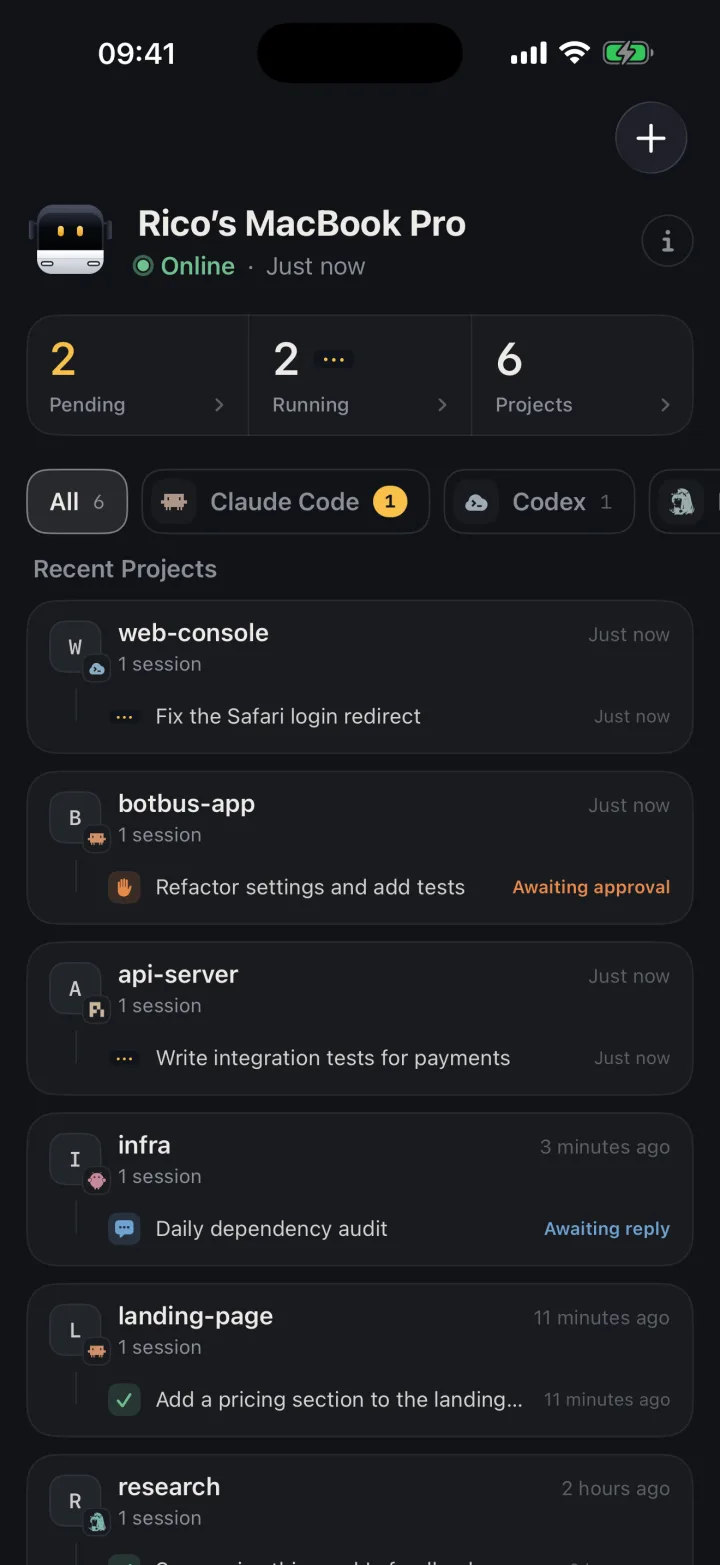
Follow tasks and read transcripts. dsh sessions sit alongside your other agents, grouped by computer and project. Tap one to read the whole conversation. BotBus reads transcripts from disk first and never loads a session into dsh just to show it, so browsing doesn't lock anything.
Get notified. When a task waits for an approval, waits for your answer, finishes or fails, your phone gets a push (provided notifications are allowed).
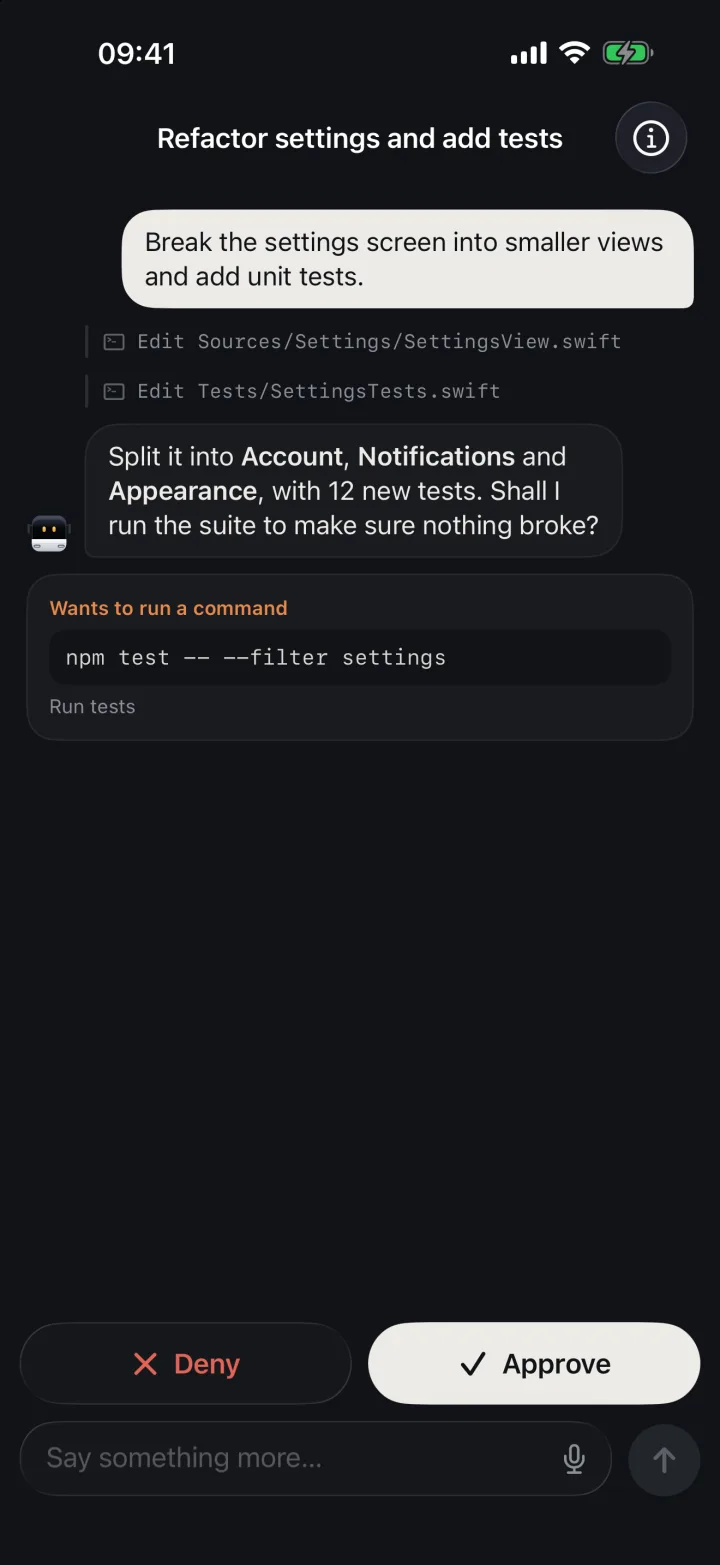
Approve and answer questions. When a session running in the dsh desktop app or dsh web stops to ask permission for a command, an approval card appears on your phone with allow once and deny. When dsh asks a multiple-choice question, you answer by picking options; deny skips the questions and the turn carries on, and a plain follow-up message while a question is pending counts as the answer. More on the approval flow in approving agent requests from your phone.
Send follow-ups. Turn finished and you want to add "write tests for that too"? Open the session and send it. If the desktop app or dsh web is running, BotBus sends it through them, and you'll see the message in the dsh UI when you're back at your desk. If neither is running, BotBus resumes the session in the background. See continuing an agent session from your phone.
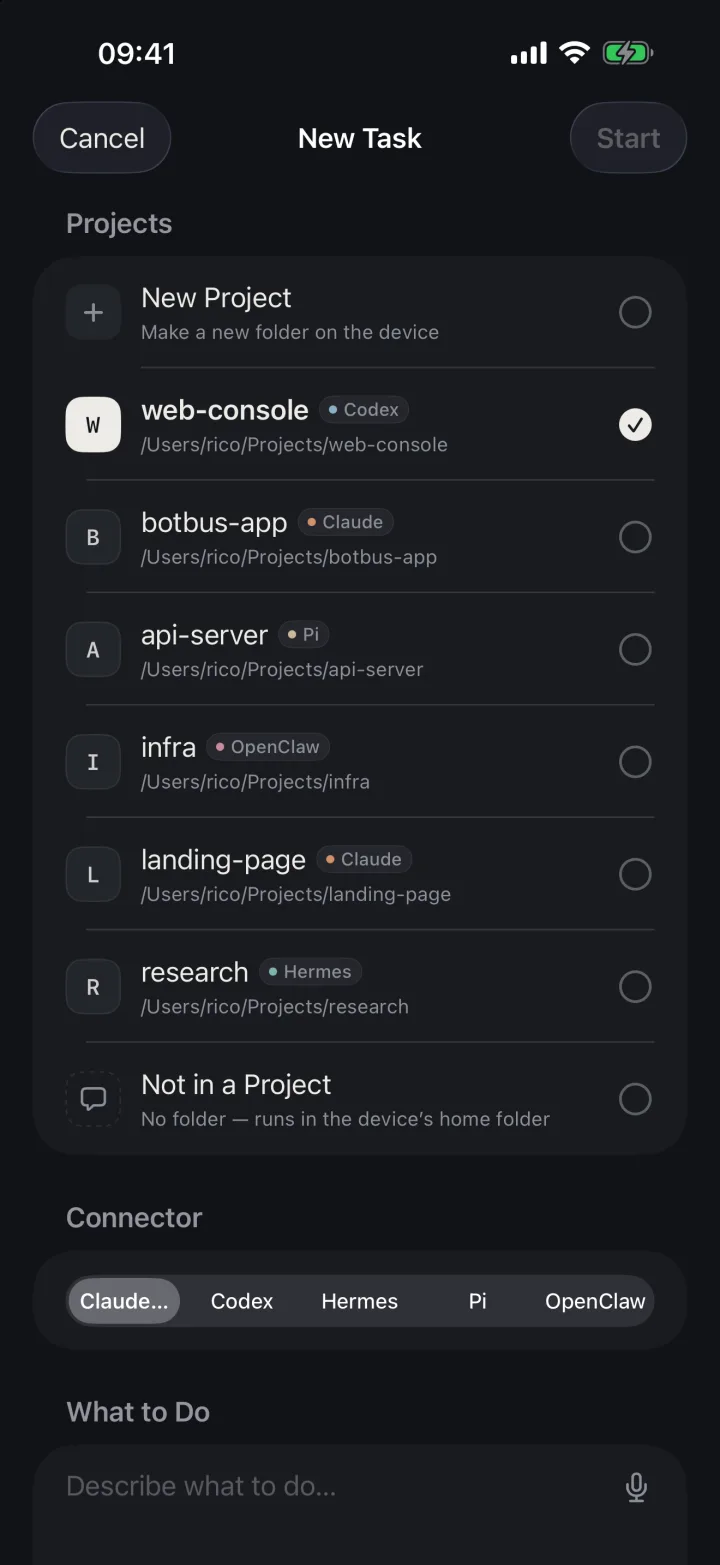
Start new tasks. Pick a project, describe the job, and BotBus starts dsh --profile acp on the Mac to run it, with approvals routed back to your phone. Once the turn is done the process exits and releases the session; if the desktop app is open, the new session is added to its workspace, so you can pick it up in dsh and go back and forth between phone and desktop in the same session.
Interrupt. If it's heading the wrong way, tap stop and BotBus sends dsh a cancel. Differences between agents are covered in stopping a coding agent remotely.
What's actually available depends on the situation: the Mac must be online; if BotBus can't find a dsh executable and only sees session files, it's view-only; and sessions it only knows from scanning disk can't be approved, because pending approvals only come through the desktop app or dsh web.
Limits and caveats
- It relies on dsh internals. BotBus talks to the desktop app and
dsh webthrough dsh's internal interfaces, not a public API. dsh moves fast, so an upgrade can need a matching BotBus update. When the connection fails, BotBus falls back to scanning disk (view-only). It never changes dsh's configuration or installs plugins. Keep BotBus on the latest version. - No live status without a dsh server. With neither the desktop app nor
dsh webrunning, BotBus only reads local session files, so whether a desktop session is still running or waiting on you won't be accurate on the phone, and its approvals won't reach you. Keep one of them open if you want full control. - Loaded sessions stay locked. Only one process can write to a dsh session at a time. Once the desktop app or
dsh webhas loaded a session, BotBus continues it through that server. If the server is gone but another dsh process still holds the session, the phone tells you the session is open in DeepSeek Harness on the computer. - No images. Sending images from the phone only works with Codex and Claude Code. For dsh you get a clear "not supported" message rather than a silently dropped picture.
- Desktop-session approvals are allow-once or deny. Approvals answered through the desktop app or
dsh webhave no "always allow" option. - No one-click resume in Terminal. For other agents the menu bar offers a button that resumes a phone-started session in Terminal with the agent's own command. dsh has no verified resume command for that, so there's no button; phone-started dsh sessions show up in the session list of the desktop app or
dsh web. - A sleeping Mac stops everything. BotBus doesn't prevent sleep. While the Mac is asleep or offline you can read what's already synced, but approvals, follow-ups, new tasks and interrupts wait until it's back.
- Content is encrypted, metadata isn't. Conversations, commands and approval details are encrypted on your devices before they reach the relay. The relay can still see device IDs, online status, update times and data sizes, and dev previews are outside end-to-end encryption. Details in the security overview.
- The phone app is iPhone and Apple Watch only for now. It's on the App Store and requires iOS 26 / watchOS 26 or later.
FAQ
Is there an official DeepSeek Harness mobile app?
Not as of 2026-10-04. dsh officially offers a CLI, the dsh web UI and a desktop app. The mobile apps and plugins on GitHub are community projects.
Do I need to expose dsh web to the internet to use BotBus?
No. BotBus only connects to the dsh server locally on your Mac. Phone and Mac talk through BotBus's own encrypted relay, and the dsh port stays bound to loopback.
Does it work without the desktop app or dsh web running?
Partly. You can browse sessions, and you can start new tasks and send follow-ups because BotBus launches dsh itself. But desktop sessions won't show live status and their approvals won't reach you. Keep one of them running for full control.
Does BotBus read my DeepSeek API key?
No. It only reads the signing key dsh uses for its web login, to connect to the local dsh server. It doesn't read model API keys and doesn't log the key.
How do I get started?
Install the latest BotBus on your computer, scan the pairing QR code with your phone, and DeepSeek Harness appears in the list of local agents automatically. Downloads are on the home page.