The short answer
If the turn was started or continued from your phone, open the session while it's running and tap the red stop button next to the message box. BotBus sends an interrupt to the agent on your computer, the agent stops, and the task shows as Interrupted. Two conditions apply: the computer has to be online, and BotBus has to own that turn. For Claude Code, Hermes and Pi, BotBus can only interrupt processes it launched itself. A session you started in your own terminal will tell you it can only be stopped on the computer.
Why a remote stop button matters
Letting a coding agent work unattended is the whole point, but the expensive failure isn't slowness. It's an agent that has misunderstood the task and keeps going: editing the wrong package, rerunning a test that can never pass, or turning a small refactor into a rewrite of half the repo. At your desk you'd press Esc and redirect it. Away from your desk, every extra minute means more changes to untangle later and more of your usage quota spent on work you'll throw away.
Approvals help with single risky actions. They don't help when every individual step looks reasonable but the overall direction is wrong. In that case you don't want to reject commands one by one. You want the turn to stop.
How to interrupt from your iPhone
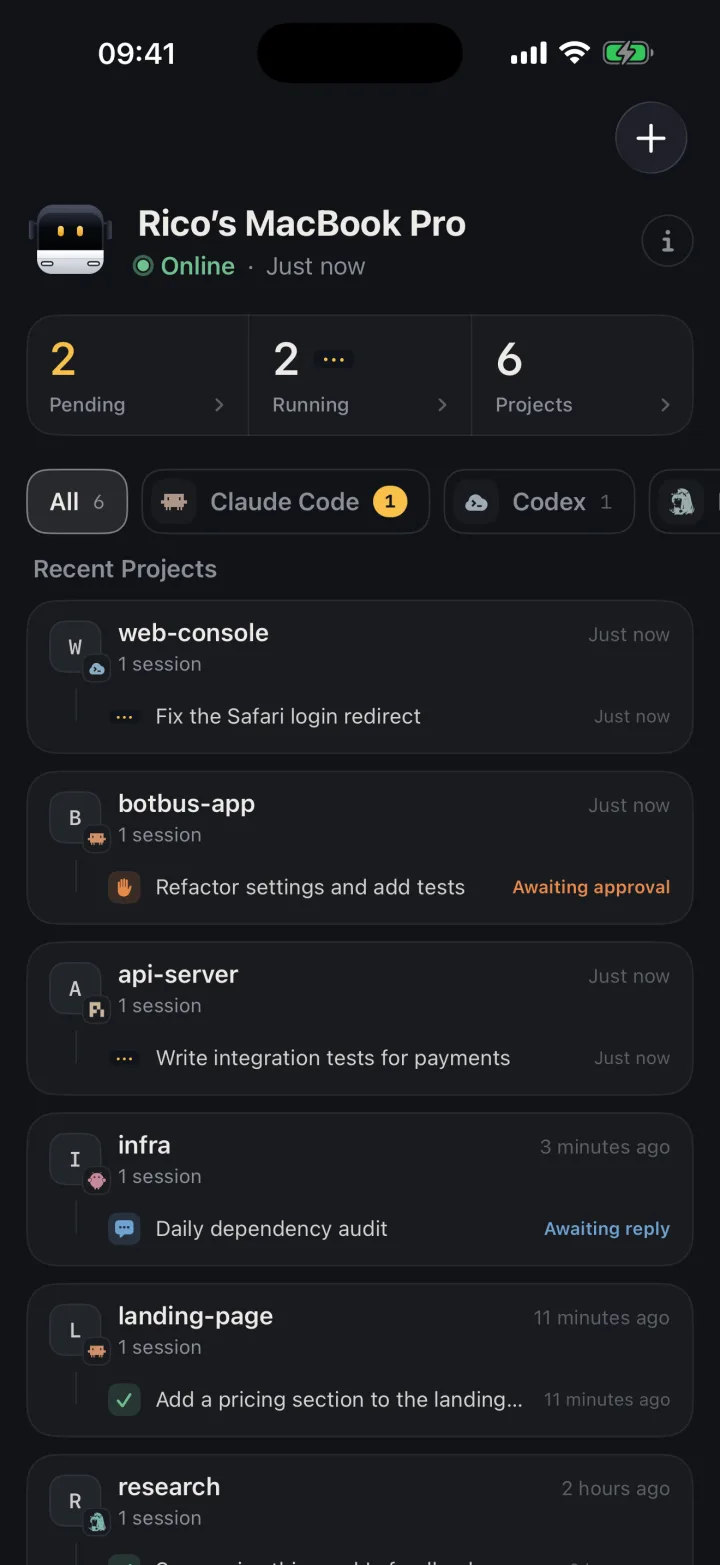
- Find the running task. The computer page shows a "Running" count. Tap it to get a list of everything currently running on that machine. Each row has its own Interrupt button, so you can stop a task without opening it. Tap the row itself if you want to see what the agent is doing first.
- Check before you stop. The session view shows the agent's latest replies and actions. Once you're sure it's off track, tap the red stop button beside the input field. The button only appears while the task is running and disappears once the turn ends.
- Wait for the computer to confirm. The command is encrypted on your phone, passes through the relay server, and is handed to the right agent by BotBus on your computer. The button stays disabled until the computer replies. If no confirmation arrives within 60 seconds, the app shows "Not confirmed". Retries reuse the same command ID and the computer deduplicates them, so tapping again won't trigger a second interrupt.
- Watch the status change. Once the computer has handled it, the task status updates to Interrupted.
Apple Watch works the same way. Open the running session, scroll to the actions at the bottom, and tap Interrupt. If a notification on your wrist shows the agent doing something odd, you can stop it right there.
What actually happens on your computer
Each agent stops in a different way, and that's what decides which sessions you can stop from your phone:
- Claude Code. A turn you start or continue from your phone runs as a
claude -pchild process launched by BotBus. Interrupting sends that process an interrupt signal and also drops any follow-ups queued behind it. Any pending approval is answered as a denial, so an interrupt never turns into an approval. A session you opened yourself in a terminal or the Claude desktop app isn't a BotBus child process. BotBus can't signal it, and the phone tells you it can only be interrupted on the computer. - Codex. BotBus drives Codex through
codex app-server, and the interrupt is aturn/interruptcall on the current turn. It only works for turns that BotBus's app-server is driving. Otherwise you get an error saying no turn is being driven locally. The status doesn't flip right away. It updates once Codex reports that the turn ended as interrupted. - ACP agents and DeepSeek Harness. BotBus sends
session/cancel, and pending approvals are cancelled. This also only works for sessions running inside BotBus. - Hermes and Pi. Same as Claude Code: BotBus can only interrupt processes it started.
The rule of thumb: if the turn came from your phone, you can stop it from your phone. Sessions you started at the computer can be watched and usually approved from your phone, but you may not be able to interrupt them.
When you can't interrupt
- Reject the pending approval. If the agent is waiting for permission, rejecting blocks that step. That isn't an interrupt, and the agent may try another approach, but the risky command won't run.
- Use the Screen view. While your Mac is online, the session view has a Screen button above the input field. It lets you control the Mac from your phone, so you can switch to the terminal and press Esc or Ctrl+C, or click stop in the desktop app. The screen and your input are end-to-end encrypted too.
- Start long tasks from your phone. If you often need a remote stop, start or continue long-running work from the phone so BotBus owns the turn.
Limits worth knowing
- The computer must be online. If it's asleep, offline or has lost its network connection, the task is read-only on your phone and the action area says "This device is offline". The interrupt can't reach it.
- Interrupting doesn't roll anything back. Files already written and commands already run stay as they are. After stopping, review the uncommitted changes on your phone and decide at your desk what to keep. Running tasks in a git worktree keeps the damage contained.
- Queued follow-ups are cleared. Messages you sent to a running Claude Code session wait in a queue, and an interrupt clears them. Send them again after the stop if you still want them.
- It depends on the connector. Approving, following up, starting and interrupting all depend on what the connector supports, the task's current state, and whether the computer is online. If a button is greyed out, one of those three is usually why.
- Security scope. Commands and conversations are encrypted on your devices before they reach the relay server. The server can't read them, but it can see device IDs, online status, update times and data sizes. Details are in the security overview.
Can you use it today?
On the desktop, BotBus supports macOS 26 or later and x86_64 / aarch64 Linux (a command-line program that doesn't offer the Screen view yet). The iPhone and Apple Watch app is available on the App Store. Windows and Android are planned. To start work from your phone, see how to start a Claude Code or Codex task from your phone. To redirect an agent once it has stopped, see continuing an agent session on your phone. Downloads are on the home page.
FAQ
Can I interrupt a Claude Code session I started in my terminal?
Not directly. BotBus didn't launch that process, so it can't signal it, and the phone tells you to stop it on the computer. You can still reject its pending approvals, or use the Screen view to press stop in the terminal yourself.
Does interrupting undo the agent's changes?
No. It only stops the current turn. Changes already on disk stay there, and it's up to you to review them and decide what to revert.
I tapped Interrupt and nothing happened. What now?
Check whether the computer is online first. If the computer hasn't confirmed within 60 seconds, the app shows "Not confirmed". Retrying reuses the same command ID, so it won't run twice. If the computer really is offline, the command can't be delivered until it reconnects.
What's the difference between interrupting and rejecting an approval?
Rejecting blocks one action, and the turn may keep going. Interrupting stops the whole turn. Use interrupt when the direction is wrong, and reject when there's just one command you don't want to run.
Can I stop a task from Apple Watch?
Yes. Open the running session on your watch and tap Interrupt in the actions at the bottom. The same conditions apply: the computer must be online and BotBus must own the turn.