Short answer
As of 2026-10-08, Nous Research ships Hermes Agent as a terminal program, a desktop app, a local web dashboard (hermes dashboard) and a messaging gateway that speaks to Telegram, Discord, Slack, WhatsApp, Signal and a long list of other chat platforms. There is no official iOS or Android app; the feature request for one (#126292) is still open. So "Hermes on my phone" today usually means chatting with it through the gateway, or exposing the dashboard somewhere your phone can reach.
If what you want is a task list, the full transcript of each session, and Hermes sitting next to Codex and Claude Code in one place, BotBus is another option. It reads Hermes's local session database on your computer and syncs it, end-to-end encrypted, to your iPhone, Apple Watch or Android phone, where you can follow up, start a new task or stop one. None of these exclude each other, and plenty of people will want more than one.
What Hermes offers today
Checked against the Hermes Agent website and docs on 2026-10-08:
- CLI. Installed with a one-line script.
hermesopens the interactive TUI;hermes chat -q "…"runs a single query. macOS, Linux and Windows are supported. - Desktop app. Installers for macOS and Windows on the official site.
- Web dashboard.
hermes dashboardstarts a local server on127.0.0.1:9119. The Sessions tab lets you search and read history including tool calls; the Chat tab embeds the full TUI in the browser. The docs warn that the dashboard can read your.envwith API keys. Binding it to a non-loopback address with--hostforces authentication: username and password (trusted networks only), Nous Portal OAuth, or your own OIDC provider. Without one it refuses to start. - Messaging gateway.
hermes gatewayruns one background process for every chat platform you configure. Each chat gets its own session;/newand/resetstart over,/sessionsand/resumebring old ones back. Dangerous commands can be approved or rejected in the chat with/approveand/deny. By default only allowlisted users, or people paired through a DM code, can talk to it. - Phone apps. None official. Several community clients exist on GitHub and the app stores. They state they are not affiliated with Nous Research, and they connect to a Hermes you run yourself, over SSH, the dashboard or the API.
Gateway vs. dashboard: who each one suits
The messaging gateway is the natural way to reach Hermes from a phone, and it's genuinely good at it. You already have Telegram or Slack open all day; Hermes becomes a contact you can send voice notes and files to, and scheduled job results arrive in the same thread. Approvals work in the chat, and several people can share one Hermes with access control. If you mainly use Hermes as a personal assistant, or it already lives on a VPS, the gateway is probably all you need.
Where it gets awkward for coding work: gateway sessions are scoped to a chat, and the docs don't describe a way to pick up the session you started in your terminal or the desktop app. Once you walk away from your desk, Telegram can't show you how far that run got. A chat is one long message stream rather than a task list, which gets confusing with several projects going at once. And messages pass through the chat platform's servers, so whether the platform can read them depends on its encryption. Telegram bot chats, for example, are not end-to-end encrypted.
The web dashboard sees every session, whether it came from the CLI, the desktop app or the gateway, and its Chat tab can continue one. It's the most complete view. The cost is getting your phone to it: bind it to your LAN with authentication, or put it behind Tailscale or a tunnel, and from then on that entry point is yours to secure, on a service that can read your keys. The Chat tab is also a terminal in a web page, which is cramped for typing and reading on a phone screen, and a backgrounded mobile browser won't alert you when a run finishes.
How BotBus connects to Hermes
Prerequisites first: the Hermes CLI is installed on the computer that runs BotBus, with a model or login already set up in Hermes, and that computer is on and online. BotBus runs on Mac (a menu bar app, macOS 26 or later), Linux (see the install guide) and Windows; install the latest version.
Hermes is a built-in agent in BotBus, so there's nothing to configure. The integration has two halves:
- Seeing. Every few seconds BotBus reads
~/.hermes/state.dbread-only and lists sessions with activity in the last 7 days (up to 200), skipping archived and hidden ones. When Hermes compresses context it ends the old session and continues in a new one; BotBus only shows the newest link in that chain. Sessions with a working directory are grouped by project. Sessions without one, from the desktop app, gateway channels such as Telegram, or cron jobs, go under your home directory as a project, so your gateway conversations show up in BotBus too. - Doing. When you follow up or start a task from the phone, BotBus runs
hermes chat -qon the computer and uses Hermes's own--resumeto continue the session. Results land in the same database.
If BotBus can't find the hermes command, sessions are shown read-only and follow-ups and new tasks are unavailable.
What you can do from the phone
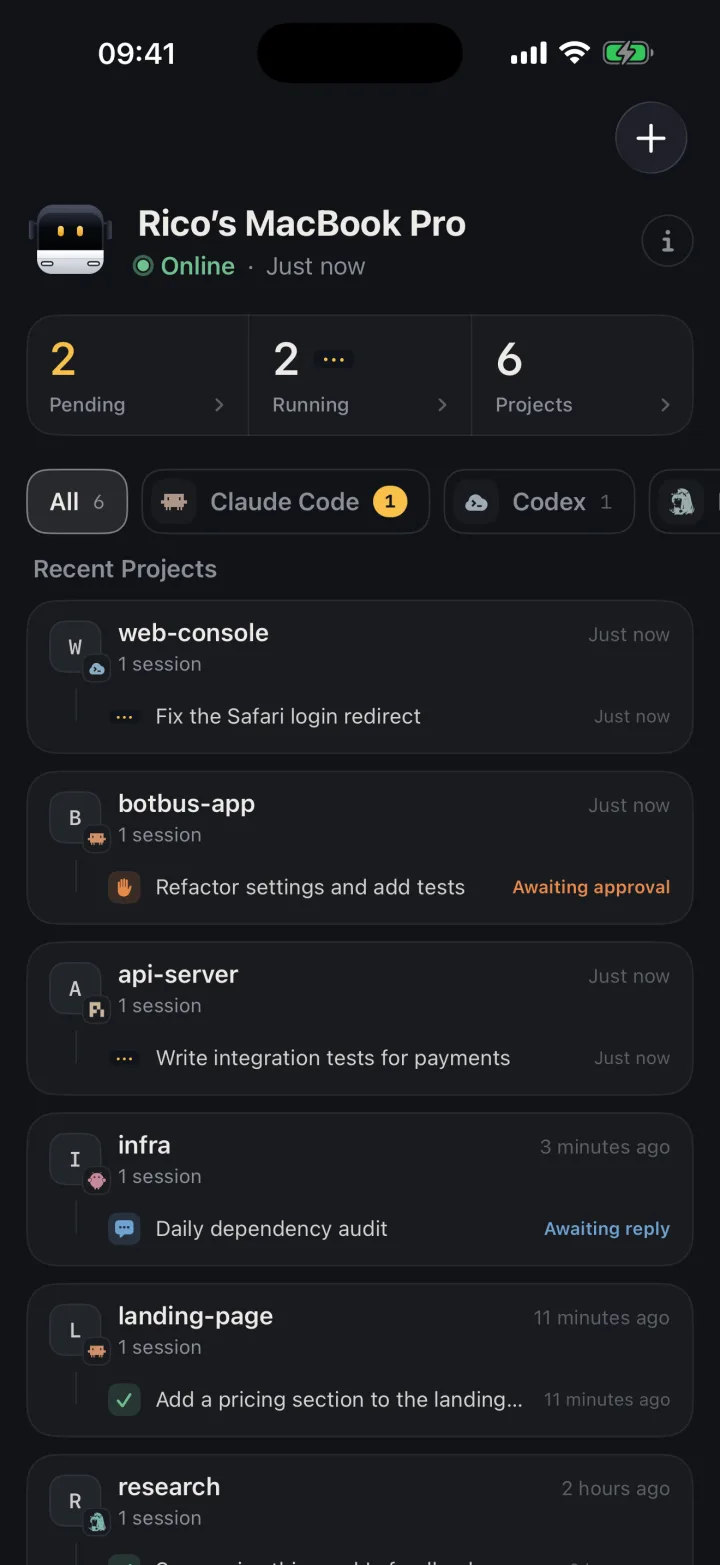
Browse sessions and transcripts. Hermes sessions from the terminal, desktop app and gateway sit alongside your other agents' tasks, grouped by computer and project. Status for those sessions is inferred from the database: a session counts as running only if it hasn't ended, had activity in the last two minutes, and its last message isn't a finished answer. Expect a few seconds of lag.
Get notified. You get a push notification when a task finishes or fails, provided notifications are allowed on the phone. More on how that works in push notifications for coding agents.
Follow up. When a run ends and you want to add "also run the tests", open the session and send it. BotBus resumes it in the original project directory. If Hermes forks a new session on resume, it appears on the phone as a new task. The general pattern is in continuing an agent session on your phone.
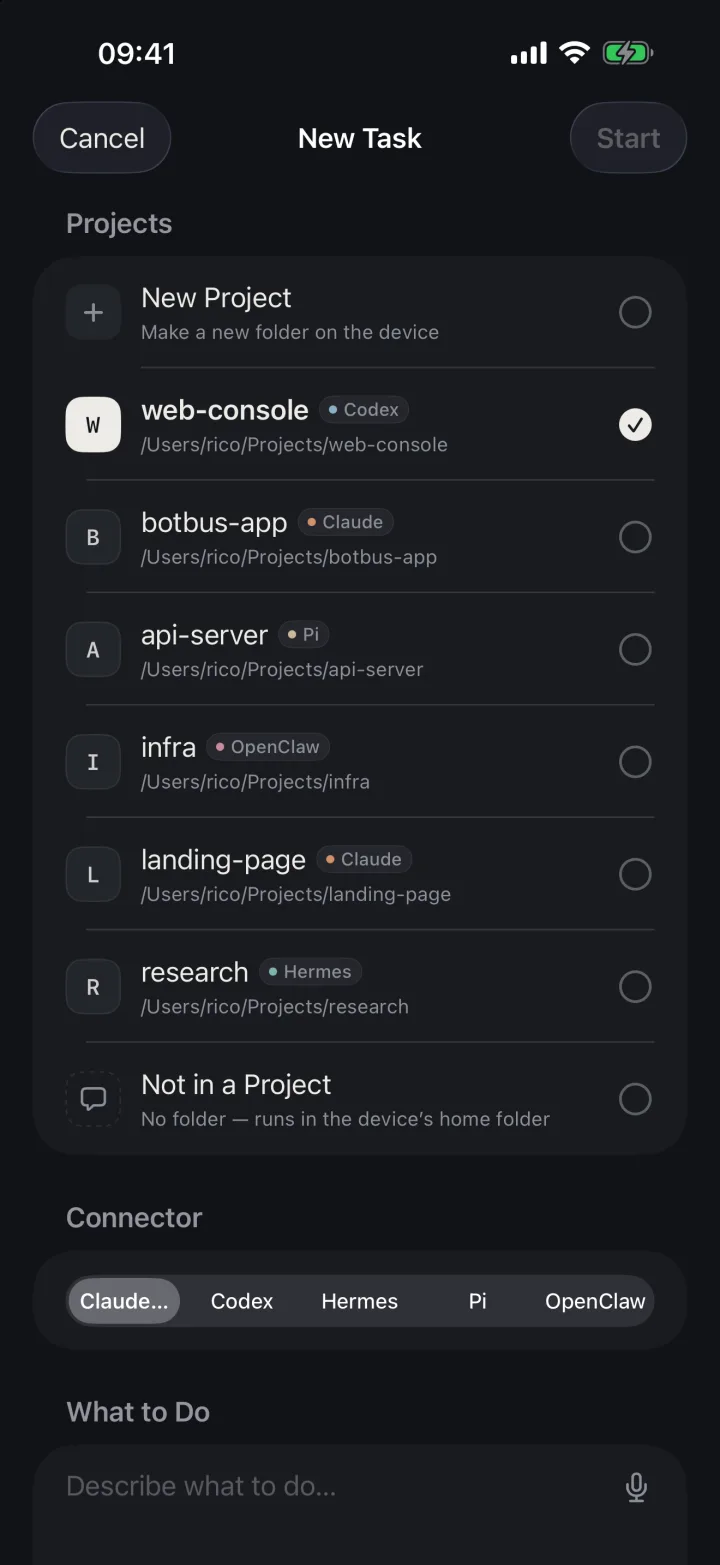
Start a new task. Pick a project, describe the work, and BotBus starts Hermes on the computer. It also passes Hermes instructions for the botbus command-line tool so the agent can send files and links back to your phone. Hermes's single-query mode can't attach extra tools on the fly, so whether those instructions are picked up depends on Hermes itself.
Stop a run. If a phone-started run heads the wrong way, tap stop. Differences between agents are covered in stopping an AI agent remotely.
Pick it back up at your desk (Mac). The Hermes row in the menu bar lists sessions started from the phone. "Continue" opens Terminal and runs hermes --resume <id>.
Limits
- No approvals. The
-qsingle-query mode BotBus uses has no approval channel, so Hermes approval cards never appear on the phone. Dangerous commands are handled by Hermes's ownapprovals.single_query_modesetting, which defaults todeny. Setting it toapprovelets every flagged command in a single-query run go through with no human in the loop; keeping the default is the safer choice. If you need to approve commands one by one from your phone, the gateway's/approveis the better tool. - Sessions running at your desk are hands-off. If a session is currently running in your terminal or the desktop app, you can't follow up from the phone, because
--resumewould fight it for the same session, and you can't stop it, because BotBus doesn't own that process. Wait for it to finish. - No model switching, auto-approve or deleting sessions from the phone. Those are only offered for some built-in agents. Hermes uses whatever model its own config says.
- No images. A message with an image is rejected outright for Hermes, rather than sent as text with the picture silently dropped.
- Last 7 days only. Older and archived sessions don't appear.
- A sleeping computer stops everything. BotBus doesn't prevent sleep. While the computer is asleep or offline you can read what has already synced, but follow-ups, new tasks and stopping wait for it to come back.
- Content is encrypted; metadata isn't. Conversations, commands and results are encrypted on your devices before they reach the relay, so the server can't read them. It can see device IDs, online status, update times and data sizes, and development previews are outside end-to-end encryption. Details in the security doc.
- Phone apps. iPhone and Apple Watch are on the App Store (iOS 26 / watchOS 26 or later). The Android app needs Android 8.0 or later and is a direct download from the home page.
FAQ
Is there an official Hermes Agent mobile app?
Not as of 2026-10-08. Nous Research offers the CLI, a desktop app, the hermes dashboard web UI and the messaging gateway. The phone clients you'll find are community projects that connect to a Hermes you host.
I already talk to Hermes on Telegram. Do I need BotBus?
Not necessarily. If Hermes is mostly your personal assistant and you want to approve dangerous commands from your phone, the gateway covers it. BotBus fits when you code with Hermes on your computer and want to see those desktop sessions on your phone, or you also run Codex or Claude Code and want one list. You can use both; gateway chats also show up in BotBus under your home directory.
Does BotBus need hermes dashboard or hermes gateway running?
No. It reads the local session database directly and runs hermes chat -q itself for follow-ups and new tasks. No dashboard, no gateway, and no ports opened to your LAN or the internet.
Will I see phone messages when I'm back at my computer?
Yes. Follow-ups are written into the same session, and hermes sessions list, the dashboard and the desktop app all read that same database. On Mac you can also use "Continue" in the menu bar to resume it in Terminal.
How do I get started?
Install the latest BotBus on your computer and scan its pairing QR code with your phone. If Hermes is installed, it appears in the local agent list automatically. Downloads are on the home page.