The short answer
As of 2026-10-06, OpenCode ships a terminal app, a desktop app, editor extensions and a browser UI (opencode web). There is no official iOS or Android app. If you want to check an OpenCode session, send a follow-up or start a new task while you are away from your desk, you have three realistic options: expose opencode web to your phone over your LAN or a tunnel, install one of the community mobile clients, or use BotBus, which reads OpenCode sessions on your computer and syncs them to your phone and Apple Watch through an end-to-end encrypted relay, without opening any OpenCode port.
This post covers when each option makes sense, then what BotBus can and cannot do with OpenCode.
What OpenCode offers today
Checked on 2026-10-06 against the opencode.ai download page and docs:
- Terminal app. The main way most people use it, installable with the install script, npm, bun, Homebrew and others.
- Desktop app. Official builds for macOS, Linux and the other major desktop systems. The desktop app and the terminal app share the same local session data.
- Editor extensions. VS Code, Cursor, Zed, Windsurf, VSCodium and more.
- Browser UI.
opencode webstarts a local server and opens your browser. It listens on127.0.0.1by default; pass--hostname 0.0.0.0to reach it from other devices on your network, and--mdnsto advertise it asopencode.local. SetOPENCODE_SERVER_PASSWORDto require a password; the docs say plainly that without it the server is unsecured. You can also attach a terminal UI to the same server withopencode attach. - Share links.
/sharecreates a public link to a session that anyone with the URL can open, and syncs the conversation to OpenCode's servers until you run/unshare. Useful for showing someone a conversation, not for remote control. - Mobile. No official app. There are several community clients on GitHub and in app stores; all of them say they are unofficial, and all of them connect to an
opencode serve/opencode webserver you run yourself.
So "OpenCode on your phone" really means one of two things: let the phone reach the OpenCode server on your computer, or sync the sessions out some other way.
The free options, and who they suit
opencode web on your LAN. Start it with --hostname 0.0.0.0, a fixed port and a password, then open your computer's address in your phone's browser on the same Wi-Fi. This is the least effort and you get the full web UI. The catch: it stops working the moment you leave that network, the UI was not designed for a phone screen, and once the browser is in the background nothing on your phone tells you OpenCode is waiting.
Tailscale, Cloudflare Tunnel or a reverse proxy. To reach it from anywhere, put the server behind a mesh VPN or a tunnel. This is what the community clients recommend too: run opencode serve with auth, then expose it over HTTPS. It is a good fit if you already run Tailscale or know your way around Caddy or Nginx. The trade-off is that you now maintain an entry point into your machine yourself, and its passwords, certificates and access scope are on you.
Community mobile clients. Search for "opencode mobile" and you will find a native Android client, a client with an iOS beta, and a wrapper around the web UI. They talk to OpenCode's HTTP API directly, so they stay close to what OpenCode can do and do not route through a third-party relay. Check how each one expects you to expose the server, how it authenticates, and whether its iOS version is actually released.
If OpenCode is the only agent you use, you are comfortable with networking and you want the complete desktop UI on your phone, any of these works. BotBus fits a different situation: you run OpenCode alongside Codex or Claude Code, you want one list of everything with a push notification when a run finishes, and you would rather not open ports, edit OpenCode's config, or remember to start opencode web before you leave.
How BotBus connects to OpenCode
Prerequisites first: the OpenCode CLI is installed on the computer running BotBus, and you have already set up a working model in OpenCode. The computer has to be on and online. BotBus runs on Mac (a menu bar app, macOS 26 or later) and Linux (a command-line program for x86_64 and aarch64, see the install guide). Install the latest version.
OpenCode is a built-in agent in BotBus, connected over ACP (Agent Client Protocol), so there is nothing to configure. BotBus looks for the opencode command on your PATH and in the official install directory ~/.opencode/bin. If you only have the desktop app, install the CLI too: follow-ups and new tasks from your phone run through it.
Session discovery is simple. The OpenCode desktop and terminal apps share a local database, and BotBus reads it (read-only) every 5 seconds, listing sessions from the last 7 days across all projects and skipping archived and subagent sessions. Viewing history only reads that database; BotBus never loads a session just because you opened it on your phone. You see the conversation itself; the model's reasoning is not shown.
What you can do from your phone
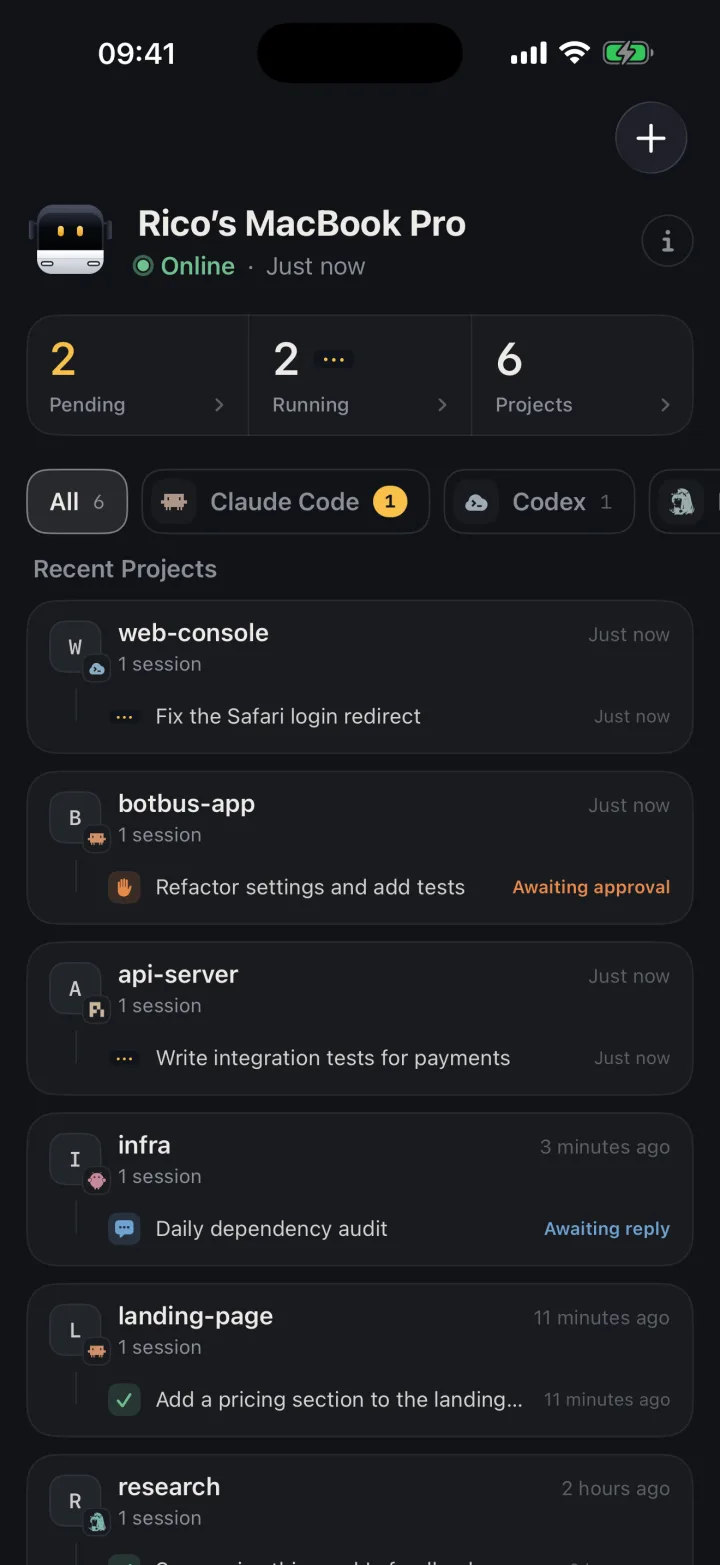
Browse sessions and transcripts. Sessions you started in the OpenCode desktop app or terminal show up next to your other agents' tasks, grouped by computer and project. Tap one to read the whole conversation.
Get notified. You get a push when a task finishes or fails, as long as notifications are allowed on the phone. Status for sessions running on the computer comes from the 5-second database scan, so expect a few seconds of lag.
Follow up. When a run ends and you want to add "also run the tests", open the session and type it. BotBus loads the original session with opencode acp on your computer and sends your message, and the result lands in the same session, so you can pick it up in OpenCode when you are back. More on this in continuing an agent session from your phone.
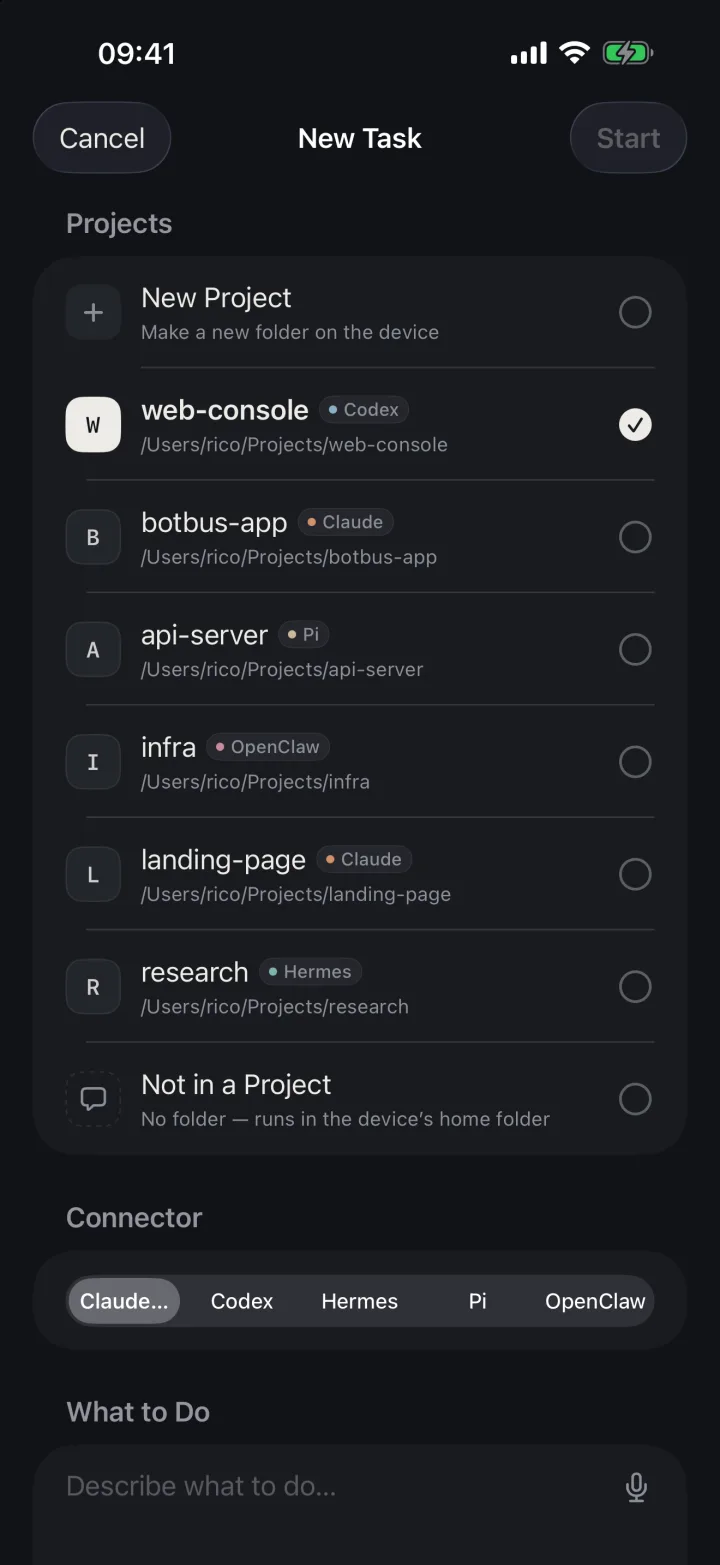
Start a new task. Pick a project, describe the job, and BotBus runs OpenCode on your computer. In turns started from your phone, the agent can use BotBus tools to send files, web previews and links back to you, for example a preview of the page it just changed.
Approve. OpenCode allows most tools by default and only asks in cases like repeated identical tool calls or access outside the project directory; you can make more actions require confirmation in opencode.json. In turns started from your phone, those confirmation requests appear as approval cards you can allow or deny. See approving agent requests from your phone.
Stop a run. If a phone-started turn goes off track, tap stop and BotBus sends OpenCode a cancel. How stopping differs per agent is in stopping an AI agent remotely.
Pick it back up on the Mac. The OpenCode row in the BotBus menu lists sessions started from your phone. "Resume" opens Terminal and runs opencode --session <id> in the original directory.
Limits
- A turn running on the computer stays on the computer. BotBus only reads the database for desktop and terminal sessions; it does not take them over. While one of those turns is still running, BotBus refuses a follow-up from the phone rather than running two at once, and any confirmation prompt in that turn has to be answered at the computer. Stopping from the phone only works for phone-started turns.
- No "waiting for reply" state. ACP has no signal for "the agent is asking you a question", so when OpenCode asks something in the conversation, the phone just shows the turn as finished.
- No model switching or auto-approve from the phone. Those controls are only available for some built-in agents today. OpenCode uses the model and permissions from its own config.
- Don't count on sending images. Sending images from the phone is supported and tested only for Codex and Claude Code.
- Last 7 days only. Older sessions, archived sessions and subagent sessions are not listed.
- A sleeping computer stops everything. BotBus does not keep your computer awake. While it is asleep or offline you can read what has already synced, but follow-ups, new tasks and stopping wait until it is back.
- Content is encrypted, metadata is not. Conversations, commands and approvals are encrypted on your devices before they reach the relay, which cannot read them. It can see device IDs, online status, update times and payload sizes, and development previews are outside end-to-end encryption. Details in the security overview.
- Phones. iPhone and Apple Watch apps are on the App Store (iOS 26 / watchOS 26 or later). The Android app needs Android 8.0 or later and is a direct download from the website.
FAQ
Is there an official OpenCode mobile app?
Not as of 2026-10-06. OpenCode offers a terminal app, a desktop app, editor extensions and opencode web. The mobile clients you can find are community projects, and they all need you to expose an OpenCode server to your phone.
Do I need to keep opencode web running for BotBus?
No. BotBus reads OpenCode's local database to list sessions and starts opencode acp itself for follow-ups and new tasks. It does not depend on opencode web and does not open any port on your network.
I only have the OpenCode desktop app. Is that enough?
BotBus needs to find the opencode CLI. Install it following OpenCode's instructions, either on your PATH or in ~/.opencode/bin.
Will I see messages I sent from my phone when I'm back at my desk?
Yes. Follow-ups go into the same session, and sessions started from the phone are in OpenCode's session history. On the Mac you can also hit "Resume" in the menu to reopen one in Terminal.
How do I get started?
Install the latest BotBus on your computer, scan the pairing QR code with your phone, and OpenCode appears in the computer's agent list automatically. Downloads are on the home page.