The short answer
As of October 28, 2026, Claude Code (through the Claude app), Codex (through the ChatGPT app) and OpenClaw have official mobile access, and so do Cursor, goose, GitHub Copilot CLI and Kilo Code. Hermes Agent, Pi, OpenCode and DeepSeek Harness (dsh) do not. What those four ship instead is a terminal UI, a desktop app, a local web UI or a chat gateway. If your agent has no phone app, your options are to expose its web UI to your phone, SSH in, or use a tool like BotBus that reads the agent's sessions on your computer and syncs them to your phone.
Below is a comparison table, followed by what to do in each case. Several agents have their own deep-dive posts, linked where relevant.
The comparison table (checked October 28, 2026)
Only first-party sources were used: official websites, docs, GitHub repos and store listings. These products change fast, so treat the official docs as the final word.
| Agent | Official surfaces | Official mobile app | Official remote option and main catch |
|---|---|---|---|
| Claude Code | CLI, desktop app, IDE extensions, claude.ai/code | Yes, the Claude app for iOS and Android | Remote Control needs a claude.ai subscription login. API keys aren't supported, and neither are Bedrock-style providers or a custom ANTHROPIC_BASE_URL |
| Codex | CLI, IDE extensions, ChatGPT desktop app, web | Yes, Codex inside the ChatGPT app | To reach your own machine, turn on "Control this Mac or PC" in the ChatGPT desktop app on a Mac or Windows PC, and keep it awake and online. The mobile docs only describe iOS |
| OpenClaw | CLI, Gateway, macOS menu bar app, web control UI | Yes, iOS and Android | The phone pairs with your Gateway as a node |
| Hermes Agent | CLI, desktop app, hermes dashboard web UI, gateway for 20+ chat platforms |
No | The dashboard binds to localhost and refuses to bind elsewhere without auth configured. Gateway sessions are per chat |
| Pi | Terminal UI, JSON / RPC modes, SDK | No | No built-in remote access |
| OpenCode | CLI, desktop app, IDE extensions, opencode web |
No | opencode web binds to localhost by default. On your LAN you set a password yourself, and the docs warn the server is unprotected without one |
| DeepSeek Harness | CLI, dsh web |
Not mentioned in the official README | The web UI binds to 127.0.0.1. Still a developer preview with breaking changes expected |
A few more, briefly. Cursor has an official iOS app (iOS 26 or later, Android listed as planned), and its Remote Control requires a paid plan and a recent desktop version. goose has an official iOS app that connects through a tunnel from the desktop app, which its docs call experimental. GitHub Copilot CLI can hand a session to GitHub Mobile with copilot --remote. Kilo Code has iOS and Android apps. Gemini CLI, Qwen Code, Kimi Code and Cline had no official mobile app on the check date, though Qwen Code and Kimi Code offer remote web pages you can open in a phone browser.
If your agent has an official app, start there
If you use one agent and you meet its requirements, the official app is usually the easiest choice. It ships alongside the agent and gets new features first. Claude Code's Remote Control puts a session that's running on your computer onto your phone, with files, MCP servers and project config staying local. Codex in the ChatGPT app can start tasks in the cloud or on a connected computer, show progress and let you approve actions.
Where people get stuck is usually the requirements, not the features:
- How you sign in. Claude Code running on an API key, a proxy or Bedrock can't use Remote Control. See using Claude Code with an API key or proxy from your phone.
- What kind of computer. Codex remote access requires the ChatGPT desktop app on the computer. The mobile docs don't cover Linux or CLI-only setups. Comparison: Codex in the ChatGPT app vs BotBus.
- One app per agent. Run two or three agents and you're switching apps to find out which one is waiting on you.
- Staying connected. A Remote Control session lives only as long as that process on your computer. The trade-offs are covered in Claude Code Remote Control alternatives.
If it doesn't, these are your options
Its own web UI, plus LAN or a tunnel
opencode web, hermes dashboard and dsh web all start a local web server. On the same Wi-Fi, bind it to your LAN address, set a password and open it on your phone. To use it from outside, add Tailscale or a Cloudflare Tunnel.
This is free and gives you the full interface, which makes it a good fit if you use one agent and are comfortable with networking. The costs: securing the endpoint is your job, and these dashboards can often read the config file holding your API keys. The UIs also aren't built for small screens, and a backgrounded mobile browser won't buzz when the agent stops to wait for you.
SSH and tmux
This works for every terminal agent: SSH from your phone into your computer and attach to the tmux session. It's especially practical for Pi, which has no web UI at all. The downside is that you're reading a terminal. Whether the agent is waiting on an approval or still working is something you only learn by opening the app and scrolling, and long prompts are tedious on a phone keyboard. More in a Termius alternative for Claude Code.
Chat gateways
Hermes can connect to Telegram, Slack, Discord, WhatsApp and many more, so you talk to it like a contact and approve risky commands in the chat. The upside is that you already have those apps open. The downside is that sessions are per chat, so the session you started in your terminal doesn't show up there, and several projects running at once are hard to tell apart. Details in Hermes Agent on your phone.
Read local sessions on the computer and sync them to the phone
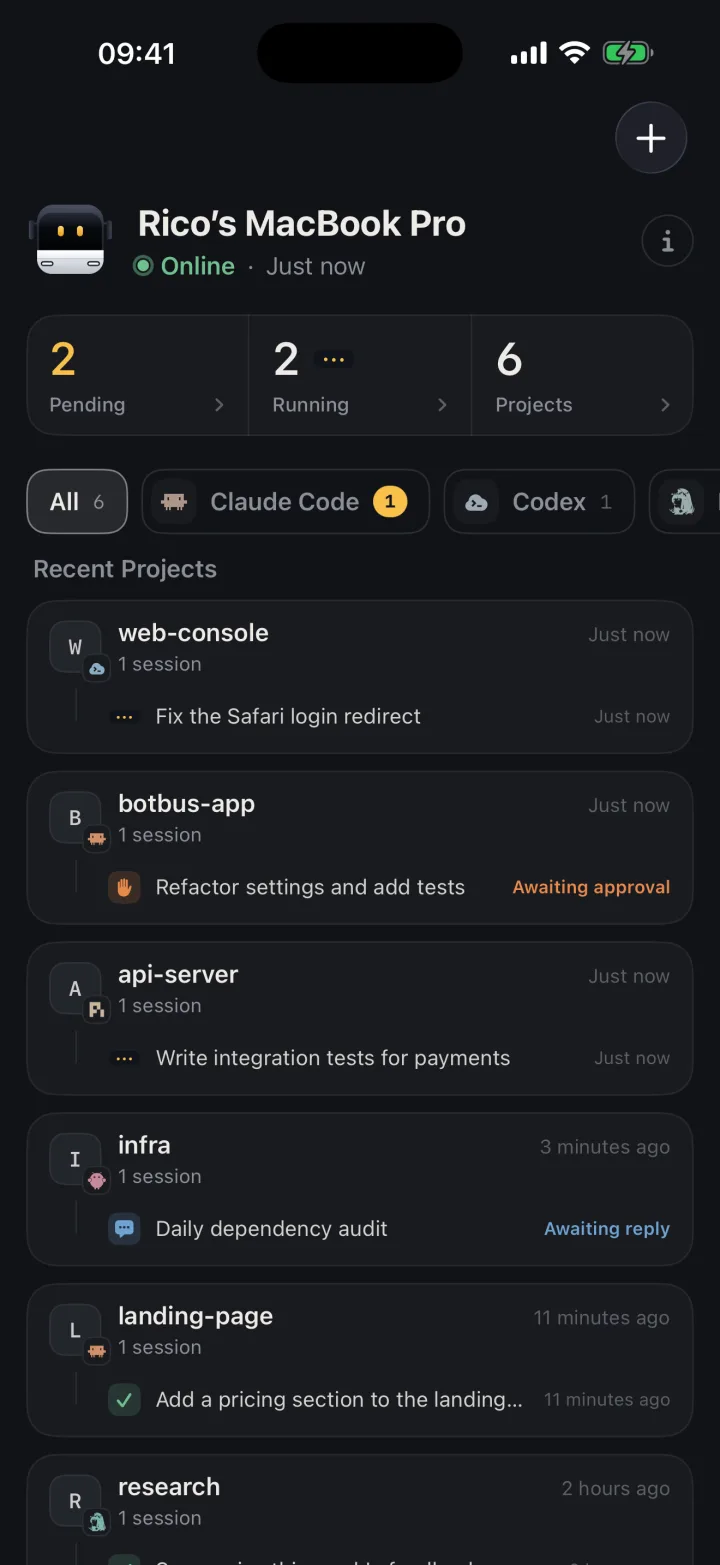
This is what BotBus does. A small app stays running on your computer and reads each agent's own session data: Codex's local database, Claude Code's hooks, OpenCode's and Hermes's session stores, and so on. It merges every agent's tasks into one list and syncs it to your phone and Apple Watch through an end-to-end encrypted relay. You keep launching agents from the terminal, desktop app or IDE as usual, with no new launch command and no open ports.
What BotBus can do for each of these agents
The preconditions: the agent is installed on the computer running BotBus and already has a model configured or is signed in, and the computer is on and online. BotBus runs on macOS 26 or later as a menu bar app, on x86_64 and aarch64 Linux as a command-line service (see the Linux install guide), and on Windows. Install the latest version.
Agent by agent, including what doesn't work:
- OpenCode: built-in support, no config needed. Desktop and terminal sessions are listed, and from the phone you can follow up, start new tasks and interrupt, with approvals in turns started from the phone. While a turn started on the computer is still running, the phone can't follow up in parallel. Details in OpenCode on your phone.
- Hermes Agent: BotBus reads Hermes's session database read-only, so sessions from the terminal, desktop app and chat gateway all show up. You can follow up, start tasks and interrupt. BotBus drives Hermes in
-qmode, which has no approval channel, so no Hermes approval cards appear on the phone. - Pi: BotBus reads Pi's session files. You can view sessions, follow up, start tasks and interrupt. Pi itself has no approval step, so there are no approvals on the phone either.
- DeepSeek Harness: with the desktop app or
dsh webrunning, session status is live and approvals and questions reach the phone. With neither running, BotBus can only read the session files on disk, so status for sessions on the computer isn't real-time. Details in DeepSeek Harness on your phone. - OpenClaw: it has its own app, so BotBus is mainly useful for keeping it in the same list as your other agents. BotBus observes and controls sessions through the Gateway, and approvals offer "just this once" or "always allow".
- Other ACP agents: BotBus ships a snapshot of the official ACP registry, so registry agents installed on your computer show up automatically. Your own agent can connect too; see the connect your agent guide. None of these except OpenCode have been individually tested, and what you can do depends on which ACP capabilities the agent implements.
Shared across all agents: push notifications when a task finishes, fails or needs approval (if you allow notifications); in tasks started from the phone, the agent can send screenshots, files and web previews back to you; one phone can pair with several computers, with tasks grouped by computer and project.
Limits
- Control depends on the connector. Approving, following up, starting and interrupting depend on what the agent's connector supports, the task's state and whether the computer is online. Where the list above says no approvals, there are none.
- Sending images works only with Codex and Claude Code. Hermes, Pi, OpenClaw and DeepSeek Harness reject images outright instead of silently dropping them.
- No "waiting for reply" for ACP agents. ACP has no signal for "the agent is asking you something", so a question shows up on the phone as a finished turn.
- A sleeping computer stops everything. BotBus doesn't prevent sleep. You can still read synced tasks, but follow-ups, new tasks and interrupts wait until the computer is back. See keeping your Mac awake for AI agents.
- Content is encrypted, metadata isn't. Conversations, commands and approvals are encrypted on your devices before they reach the relay. The server can't read them, but it does see device IDs, online status, update times and data sizes. Dev previews are outside end-to-end encryption. See the security page.
- It doesn't replace everything in the official apps. Claude Code's cloud sessions and Codex Cloud run on the vendor's servers. BotBus only handles agents on your own computer.
- Phones. The iPhone and Apple Watch apps are on the App Store (iOS 26 / watchOS 26 or later). The Android app needs Android 8.0 or later and is available as an APK from the download section on our site.
FAQ
Will OpenCode, Hermes or Pi get an official mobile app?
No way to know. As of October 28, 2026, none of their websites or docs mention one. Apps with similar names in the stores are third-party, so check how they expect you to expose your agent before using one.
My agent already has an official app. Do I need BotBus?
If you use one agent and meet its requirements, the official app is enough. BotBus makes more sense when you run several agents and want one list showing which is waiting on you, or when official remote access is ruled out because you use an API key, a proxy or a Linux machine. You can also use both.
Isn't a web UI plus Tailscale good enough?
Often it is, especially for one agent and someone comfortable with networking. The gaps are one entry point per agent, no alerts while the mobile browser is in the background, and an endpoint you have to secure yourself. BotBus opens no ports, puts every agent in one list and sends push notifications.
My agent isn't listed. Can it connect?
If it implements ACP and is in the official registry, it shows up automatically once installed on the computer. If not, write a small manifest as described in the connect your agent guide.
How do I get started?
Install the latest BotBus on the computer that runs your agents, scan its pairing QR code with your phone, and the agents installed on that computer appear automatically. Downloads are on the home page.